Incident postmortems and corrective actions, right in Jira
Afterbrief turns any Jira work item into an incident, captures its timeline while it happens, and builds the postmortem (the post-incident review) from that record. Every corrective action becomes a real Jira work item that the app follows until it is done.
Free for Jira sites of up to 10 users, with a 30-day trial above that. Runs entirely on Atlassian's platform: no data leaves your site.
Declare in one click
From the work item you are already on. Or let new work items declare themselves by space, type or label, so the 3 a.m. alert arrives as an incident.
A timeline that writes itself
Status changes, assignees, comments starting with ! and, with Slack capture on, messages from linked channels land on the incident as they happen, with their real times.
Draft with AI
On paid plans and trials, one button writes every empty section from the description, the timeline and the actions, in your team's language, and marks what it does not know instead of making it up.
A postmortem people finish
The sections of the postmortem in Atlassian's public Incident Handbook, edited in Jira, or moved to Confluence with the timeline and actions kept live.
Follow-ups that get done
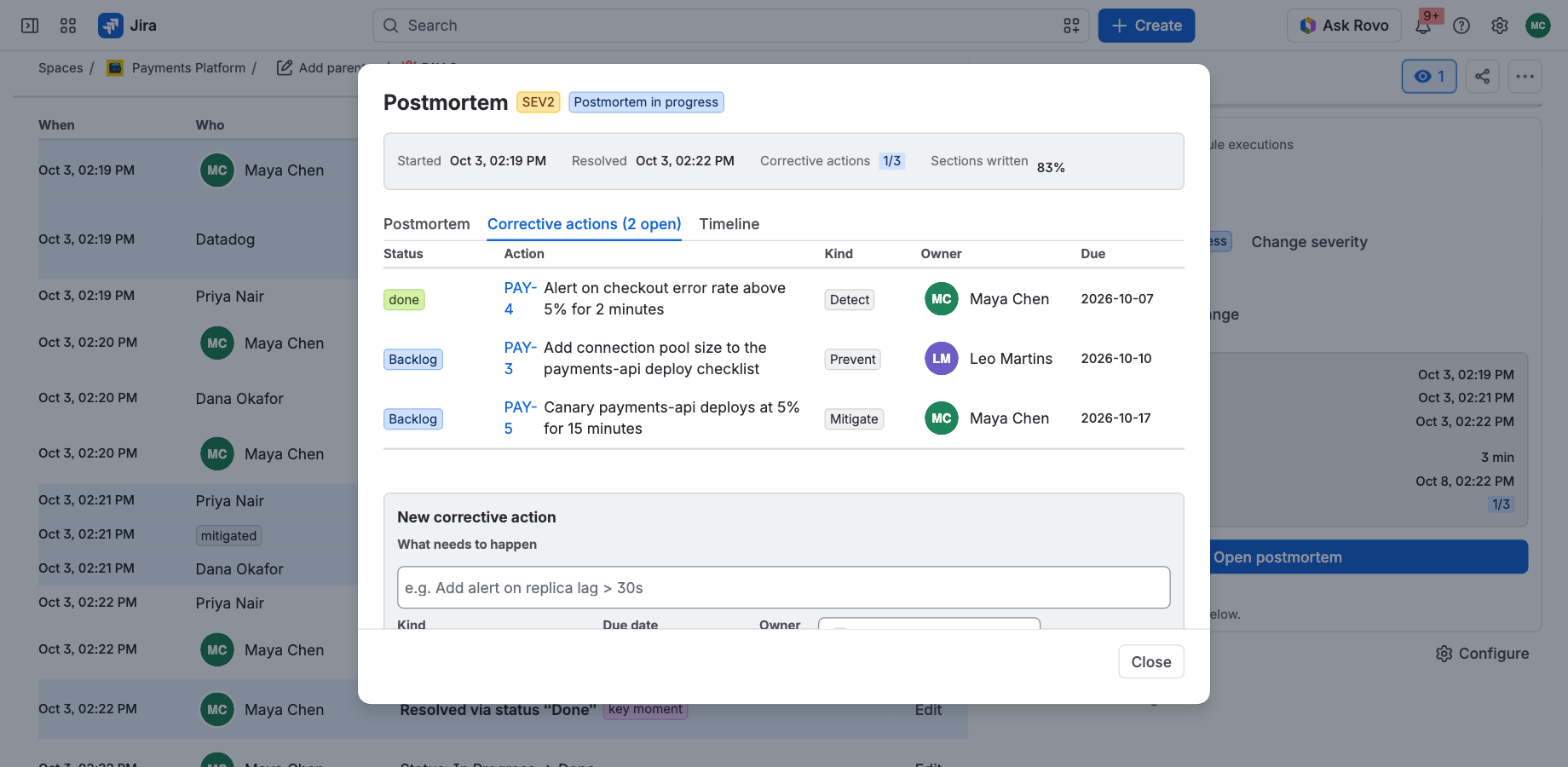
Corrective actions are Jira work items with an owner and a due date, rolled up on the incident, with optional daily reminders until they are closed.
Numbers leadership asks for
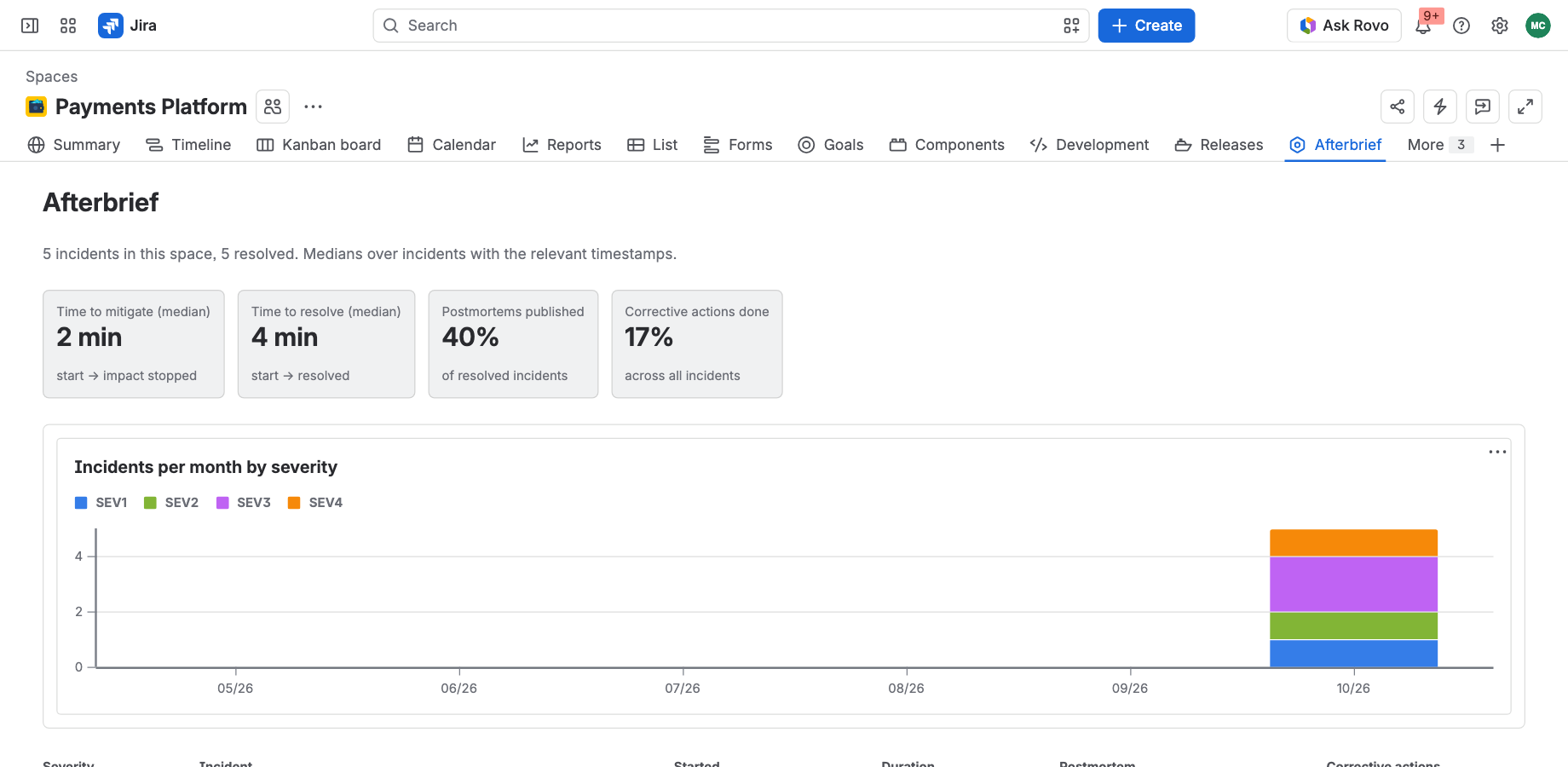
Incidents by severity, time to mitigate and resolve, postmortems written and actions finished, per space, without a spreadsheet.
Post-incident reviews on every Jira plan
Afterbrief brings the whole incident loop (declare, capture the timeline, review, follow up) to the Jira work items your team already uses, on any Jira plan. Nothing new to roll out and no new place to look. See the setup guide.
How the postmortem app works in Jira
- Declare. Open the work item that tracks the incident and press Declare incident, or let auto-declare do it when the alert creates the work item. Severity, commander and the clock start right there.
- Respond. Work as usual in Jira and Slack. The timeline fills itself; add a note or flag a key moment when it matters. Mark the incident mitigated, then resolved.
- Review. Open the postmortem, press Draft with AI for a first pass, correct it with the people who were there, and raise corrective actions as Jira work items. The incident shows how many are done until the last one closes.
Why teams pick it
| Afterbrief | Writing it up by hand | Separate incident platforms | |
|---|---|---|---|
| Lives on the Jira work item | Yes | A separate document | A separate tool |
| Timeline captured as it happens | Jira and Slack | Rebuilt from memory | Yes |
| Postmortem drafted for you | AI, from the record | No | Varies |
| Follow-ups tracked to done | Jira work items, rolled up | Bullet points | Yes |
| Where your data lives | Your Atlassian site | Wherever the doc is | The vendor's cloud |
| Rollout | Install from the Marketplace | None | New tool, new habits |
Afterbrief is for teams that want post-incident reviews where their work already is, not in a new incident platform.
Built to be trusted with incident data
- Built on Atlassian Forge, no outside calls. Atlassian's compute and storage only; incident data stays under your site's data residency.
- Respects Jira permissions. Comments on the timeline are read with each viewer's own permissions; people see a count, not the content, of actions in spaces they cannot open.
- AI that stays in Atlassian. Draft with AI uses models hosted by Atlassian and reads only what the person pressing the button can see.
- Slack is optional. The relay that brings Slack messages in runs in the EU and keeps no copy of them.
Frequently asked questions
Postmortem or post-incident review?
The same thing. Engineering teams and Atlassian's Incident Handbook say postmortem; Jira Service Management and ITIL say post-incident review, or PIR. Afterbrief covers both the written record and the review that follows it. See the postmortem template and the post-incident review template.
Do I need Jira Service Management Premium?
No. Afterbrief works on every Jira plan: Jira (including what used to be Jira Software and Jira Work Management) and Jira Service Management Free, Standard and Premium.
Which Jira projects does it work with?
Jira Cloud, in team-managed and company-managed spaces, including Jira Service Management spaces. Any work item type can be declared an incident.
Do I need Confluence or Slack?
No. The postmortem can be written and published entirely in Jira. Confluence adds a postmortem page in the shape of Atlassian's blueprint with the timeline and actions live; Slack adds automatic capture of what is said during the incident.
Does any data leave our Atlassian site?
The app itself never calls outside Atlassian. If you connect Slack, Slack messages travel through our relay on their way into your site; the relay keeps no copy. See the privacy policy.
What does Draft with AI cost, and what does it see?
It is included in paid plans: 50 drafts per site per month, and 10 during the trial. It reads only what the person pressing the button can see, and runs on AI models hosted by Atlassian. See AI drafts.
How is it priced?
Per user, billed by Atlassian through the Marketplace, monthly or yearly. Free for sites of up to 10 users, with a 30-day free trial above that.
Which languages does it support?
The app's screens are in English. What your team writes stays in your language, and Draft with AI writes the postmortem in the language of each person's Jira.
Start here
- Setup guide: install, your first incident, and every setting.
- Slack: link a channel or a thread, and the conversation lands on the timeline.
- AI drafts: what it reads, writes and costs.
- Free templates: Jira postmortem template and post-incident review template.